Why add SameSite?
- Two cookie problems: user privacy and CSRF (cross-site request forgery).
- Define the scope of cookie use to reduce the chance of attack.
Steps to set a cookie
- The client sends an HTTP request to the server.
- The server receives it and adds a Set-Cookie field to the response headers.
- The browser receives the response and saves the cookie.
- Subsequent requests to that server send cookie information in the Cookie field.
Cookie attributes
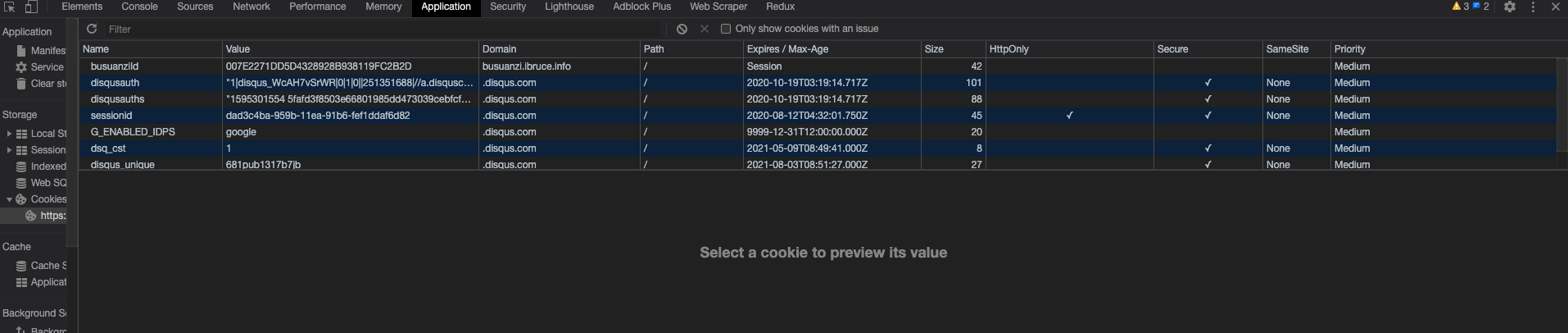
-
Name/Value
- Encode Value when manipulating cookies with JavaScript.
-
Expires
-
Expires sets the expiry time. For example:
-
Set-Cookie: id=a3fWa; Expires=Wed, 21 Oct 2015 07:28:00 GMT;
-
Without Expires, it is a session cookie, shown as Session in the illustration. Its value is held in client memory and expires when the browser closes. Some browsers restore sessions, retaining session cookies even after closing as if the browser had never closed.
-
Persistent cookies, unlike session cookies, are saved on the user's disk until expiry or deletion. The specified date and time concern the client, not the server.
-
-
Max-Age - Max-Age sets the number of seconds until expiry. For example: - Set-Cookie: id=a3fWa; Max-Age=604800; - Max-Age can be positive, negative, or zero. - A positive max-Age makes the browser persist the cookie to its cookie file. - A negative max-Age indicates a session cookie. - A zero max-Age deletes the cookie immediately. - If both exist, Max-Age takes priority over Expires.
-
Domain
- Domain specifies the host receiving the cookie. By default, it is the host of the current document URL, excluding subdomains.
- Cookies cannot be set across domains.
-
Path
-
Path specifies a URL path that must be present in the requested resource path to send the Cookie header. With Path=/docs, resources under /docs/Web/ receive it, but /test does not.
-
Domain and Path together define the cookie scope: which URLs receive it.
-
-
Secure attribute
- A Secure cookie should only be sent over HTTPS-encrypted requests. HTTPS protects cookies against theft and tampering between browser and server.
-
HTTPOnly
- HTTPOnly prevents client scripts accessing cookies through document.cookie and helps prevent XSS attacks.
-
SameSite
- In Chrome80 released by Google in February, SameSite blocks third-party cookies by default to better prevent cross-domain CSRF and protect privacy. Token+SameSite effectively addresses CSRF.
SameSite values
-
SameSite limits third-party cookies and reduces security risks. It has three values:
- Strict: only first-party requests carry cookies; the browser sends them only for same-site requests where the current page URL exactly matches the target URL.
- Lax: some third-party requests may carry cookies.
- None: cookies are sent whether cross-site or not.
-
Strict
- Strict completely prohibits third-party cookies: no cross-site request carries one. Only matching current-page and target URLs receive cookies.
- Set-Cookie: CookieName=CookieValue; SameSite=Strict;
-
Lax
- Lax relaxes the rule slightly: third-party cookies are usually withheld except for Get navigation to the target URL.
- Set-Cookie: CookieName=CookieValue; SameSite=Lax;
-
None
- Chrome plans to make Lax the default (implemented in version 80). Sites can explicitly disable SameSite by setting None, but must also set Secure, so cookies are sent only over HTTPS; otherwise it is invalid.
- Set-Cookie: widget_session=abc123; SameSite=None; Secure
SameSite impact
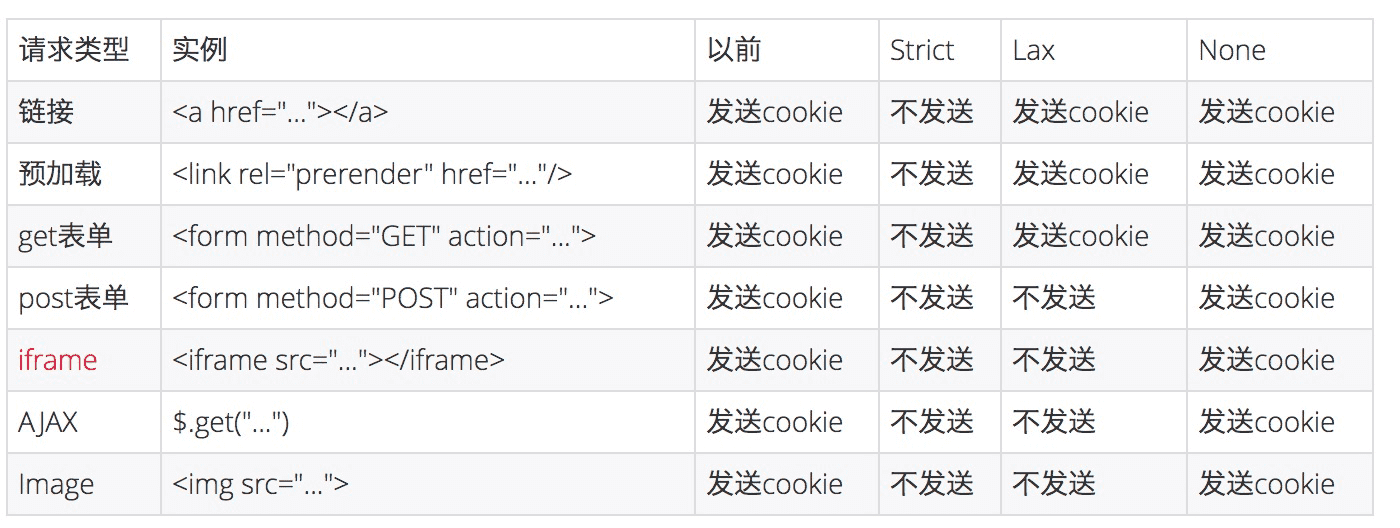
-
For most web apps, the illustration shows four cases that previously sent third-party cookies cross-site but now do not: Post forms, iframe, AJAX, and Image.
-
Post forms: expected, since forms are the standard CSRF example.
-
iframe: many embedded web apps are cross-site and will be affected.
-
AJAX: some frontend data retrieval behavior and results may change.
-
Image: images are usually on CDNs and need no cookies, so impact is limited. Images requiring authentication may be affected.
Solutions
-
Temporarily set SameSite to None, also setting Secure (Set-cookie: key=value; SameSite=None; Secure).
-
A reasonable approach follows Chrome rules:
- Use SameSite=Lax by default, none when third-party cookies are needed, and Strict for CSRF Token session cookies (SameSite is intended to prevent CSRF).
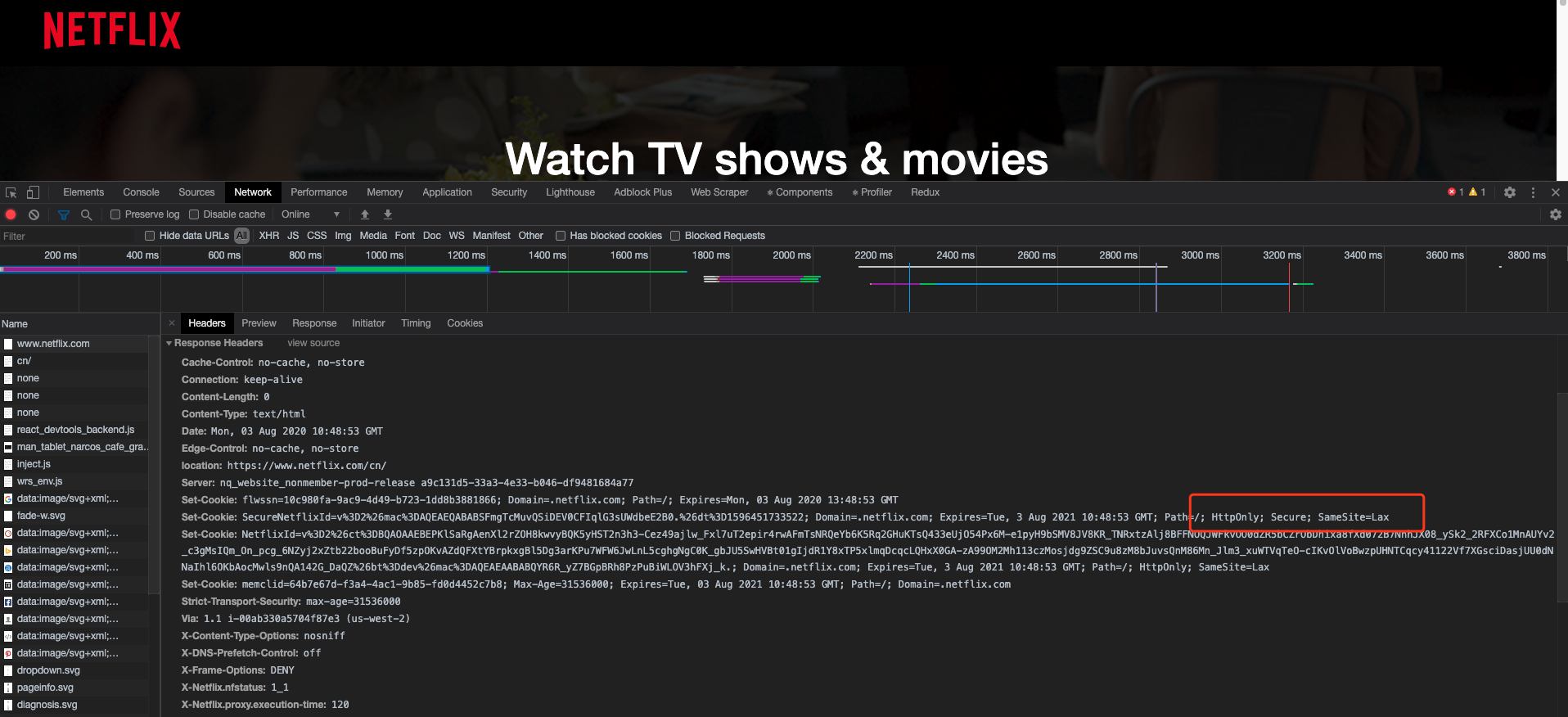
- Notice: HTTP endpoints do not support SameSite=none. Check the UA: some browsers cannot accept SameSite=none.
- Check browser UAs for SameSite compatibility
New Chrome versions (after 80): phased rollout after July 14, covering most Chrome users by July 28
-
With the July 14 stable release of Chrome 84, SameSite enforcement resumed and was also enabled for Chrome 80+.
-
Cookie validation becomes stricter; the default SameSite value changes from None to Lax.